

How Does the Indexing Process Work in Copernic Desktop Search Work?
An index is made of references that link to the items you index (files, emails, etc.). The items themselves (the real files, the real emails, etc.) are not in the index.
To update your index, Copernic Desktop Search scans the items you choose to index (emails, files, contacts, etc), to detect additions, deletions or modifications made since the last indexing process.
Copernic Desktop Search does not reindex everything. New items are indexed. Modified items are reindexed. But items that have not changed are not reindexed. While it updates the index, look at the status bar or Status window to verify whether it is indexing or only scanning items. “Scanning” means that it is verifying whether the item has been modified. “Indexing” means that Copernic Desktop Search is indexing the item.
For example, while scanning, the software detects that a file is no longer where it used to be. It thus deletes the reference to this file in the index. Then, it discovers new files in a folder so adds references to these new files in the index. If the scanning process does not reveal any modifications, it simply won’t modify the index. To change your Indexing Performance, Tools->Indexing Performance.
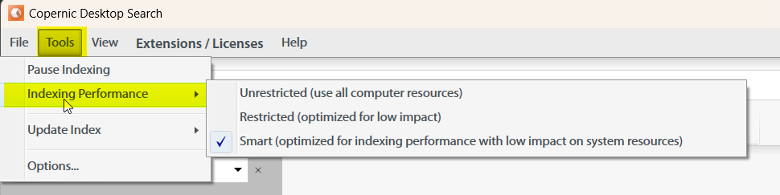
There is no better option, and these can change depending on your usage (e.g., if you’re expecting a large file to be indexed, perhaps use Unrestricted for a period when you won’t be using other areas of your device).