

How to Locate Any Email Attachment in Seconds
We’ve all been there: trying to find that attachment we know was emailed, but can’t find it. Copernic’s Refinement Tool can help! In our scenario today, we’re looking for a math test result from last year.
Our initial search is for the word “Math,” and we’ve used Date Refinement to include anything sent prior to December 31 of the previous year. We know the result was in an attachment, so we use the Sub-Documents refinement dropdown to display “Containing sub-documents.
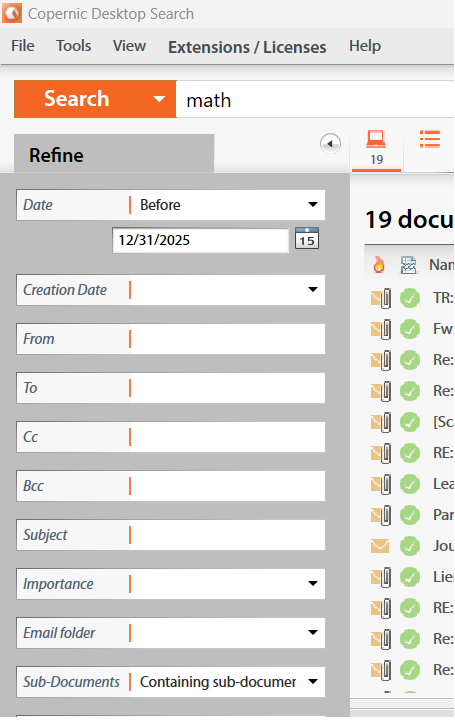
This allows our results to display only emails with attachments and found 19 documents.
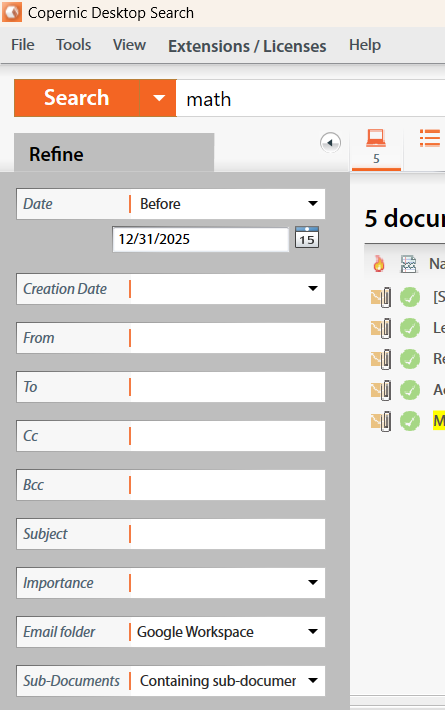
We can further narrow our results if we know which email address was used. In our next search, we use the same parameters and include our Google Workspace Email Folder. This brings our search results to only 5 documents and allows us to quickly locate the desired attachment.
Using the Refinements in your search will save you valuable time when searching for a specific document. What is your fastest search with Copernic? Share your results in our forums!