

Using the AI Extension with your Movie Files
Summary
Copernic’s AI Extension helps you understand video content directly from the Preview pane. Select “Generate Video Transcript” to access a content summary, timestamped dialogue and scene descriptions. Available to Advanced and Elite subscribers, the extension connects to your existing Gemini and OpenAI accounts and follows your account settings.
Using the AI Extension with your Movie Files
The AI Extension is available for our subscribers on the Advanced and Elite platforms. The extension uses your existing Gemini and OpenAI accounts and will react based on your settings for that account.
To use the video transcript feature for your movie files, locate the desired video and highlight it. The video will be displayed in the Preview pane. Select “Generate Video Transcript”.
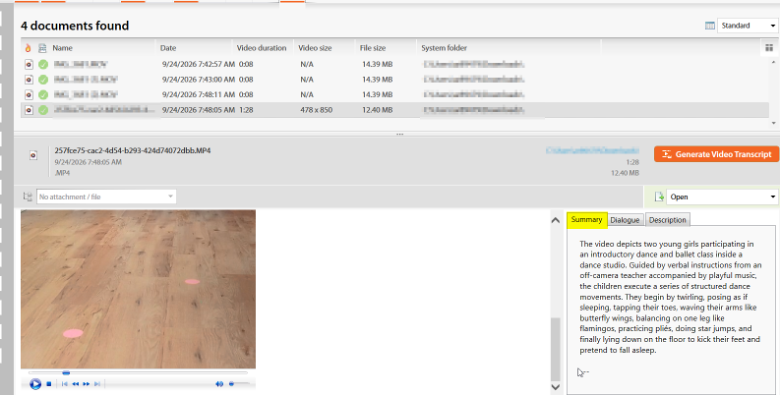
Once the transcript has completed, you will see three tabs to the right of the preview. “Summary” will offer a summary of the video’s content.
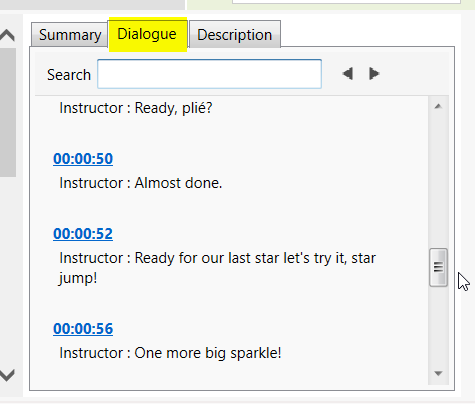
The “Dialogue” tab will script the dialogue in the video at the time marks.
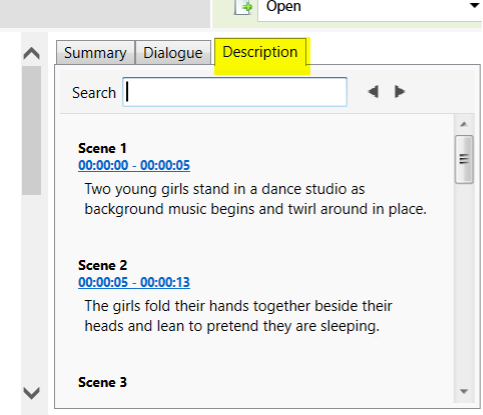
A breakdown of scenes is available in the “Description” tab.
Interested in the AI feature? If you would like to upgrade to Advanced or Elite, reach out to us at [email protected], and we’ll send you a link to upgrade your current license.