

How to Use the Word Suggestion Feature of the AI Extension
Summary
Copernic’s AI Extension enhances searches with its Word Suggestion feature. Enter a word or phrase to discover relevant synonyms and related terms across your indexed files. The extension connects to your existing Gemini or OpenAI account, and features can be managed through the AI settings. For help, contact [email protected]
How to Use the Word Suggestion Feature of the AI Extension
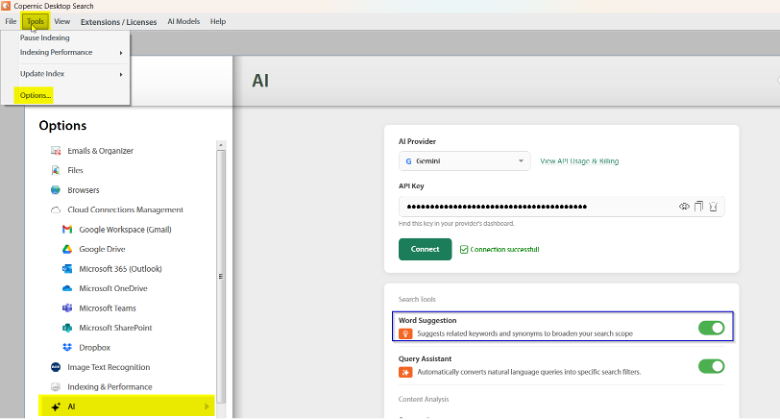
The AI extension will assist you with files once they are indexed and located. You can select the feature(s) you want to use by toggling them off and on in the AI settings:
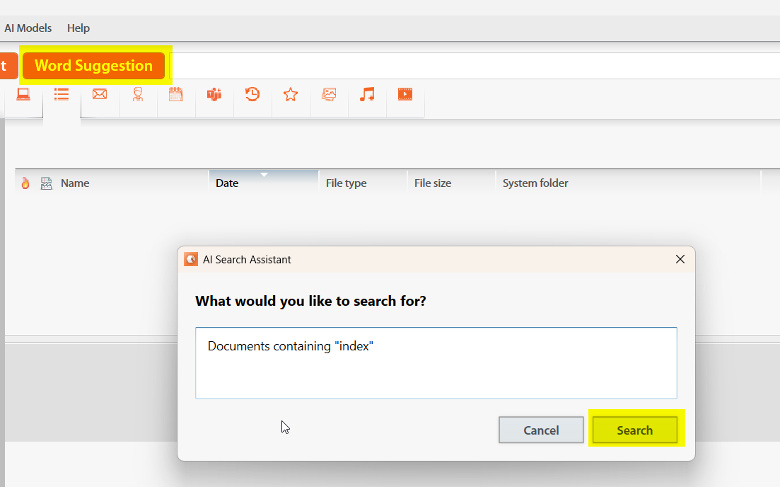
To search using the Word Suggestion, you will click on the Word Suggestion button on the dashboard. You can enter the word or phrase that you are seeking, and the system will suggest synonyms and related words for the word you’re seeking.
The AI extension works with your existing Gemini and/or OpenAI account and settings. Charges may apply and permissions are contingent upon the settings you’ve created with your Gemini and/or OpenAI account.
Have additional questions? You can reach us at [email protected].